Intake nurse availability
Let referred patients book a short nurse intake call themselves: from a shared queue, by replying to your outreach, with no separate login or form. This page covers what a clinic administrator sets up to turn that on.
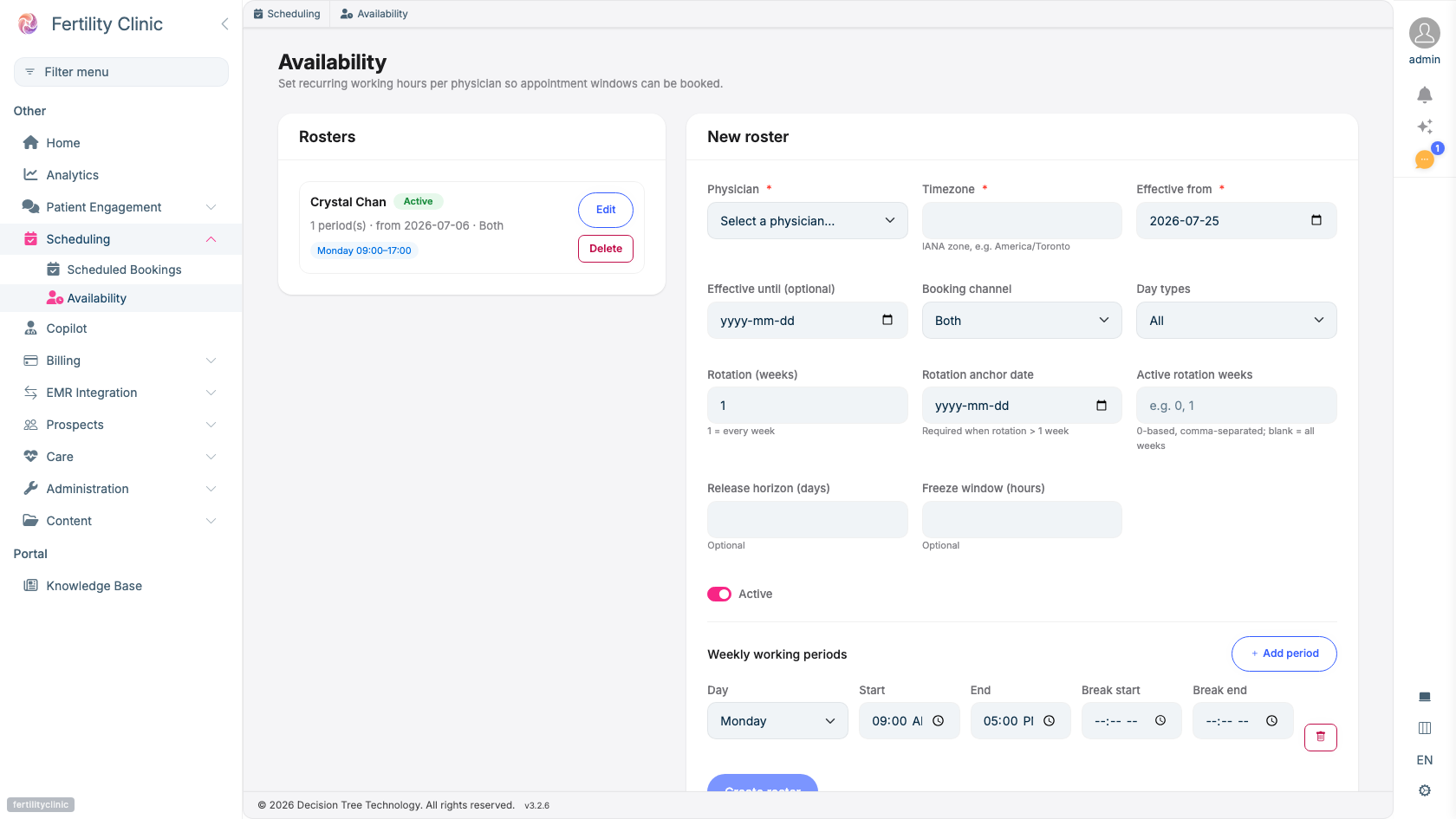
- Existing rosters. Who is bookable, and when.
- Choose the provider: a physician, or the shared intake-nurse queue.
- Limit which channels can book these slots.
- Set the hours the queue is open, with optional breaks.
After a referral is confirmed, your automated outreach reaches the patient. When they reply that they'd like to book, the assistant offers the soonest open nurse-intake slots; the patient picks one and it's booked. That booking moves the prospect to Intake booked, no staff scheduling call required; the referral stays in progress until the physician consultation is booked.
What you configure
The intake call length: you control this
Your clinic is set up with a short intake call appointment type, 20 minutes to start with. Change its length yourself on the Availability screen, in the Nurse intake booking card at the top: pick 15, 20, 30, 45 or 60 minutes.
Times are offered back to back at that length from the start of each working period, so a queue that opens at 9:00am with 30-minute calls offers 9:00, 9:30, 10:00 and so on. The same length applies everywhere a nurse intake is booked: patient replies by text, the patient portal, the website chat, the prospect's record and the calendar. It is also the length of every new booking.
If your team also books the intake call in another scheduling system, pick the length that system uses, so the time in the patient's confirmation text is one your team can book there too.
Changing the length affects new bookings only. Calls already booked keep the length they were booked with, and they still block the times they overlap: a 20-minute call booked at 9:20 keeps both 9:00 and 9:30 off the list after a switch to 30 minutes. A patient who was offered a time before the change and replies afterwards is offered fresh times instead.
How far ahead patients can book: you control this
In the same card, Booking window (days ahead) sets how far ahead nurse intake times are offered, from 1 to 60 days. Your clinic starts at 14 days. The card states the result, for example "Patients and staff can book up to 28 days ahead."
The window applies to patients booking by text, in the patient portal or in the website chat, and to staff booking from a prospect's record. Staff can still book further out from New appointment on the calendar. The assistant offers the soonest open times first, so a longer window matters most when the near-term times are full.
Anyone who can open the Availability screen can see both values; changing them needs the same permission as managing rosters.
The nurse queue: set up for you
Nurse intake is booked against a shared queue rather than a named person: a patient is booked with whichever nurse is free, so they can take the soonest slot instead of waiting on one nurse's calendar. Your clinic starts with one intake queue. Adding more nurses to the queue, or dedicating a named nurse, is also done by your Fertiligent contact today. Nurses are bookable resources; see Scheduling & booking for the underlying model.
When the queue is open: you control this
This is the part you manage yourself, on the Availability screen.
Roster rules define the hours the intake queue is bookable, for example weekdays during business hours. Only those hours are ever offered to a patient. Pick the intake nurse queue from the Provider list the same way you'd pick a physician, then set the weekly working periods.
Your clinic starts with a weekdays, 9:00am–5:00pm roster for the intake queue, in your clinic's time zone, open to both staff and patient self-booking. Edit it, or replace it, to match the hours your nurses actually take calls.
Blocking time off and one-off changes
Rosters set the recurring pattern. On top of them, you can make date-specific changes to a nurse's (or physician's) availability from Time Off & Blocks:
- Block time off. Mark a vacation, a sick day, or a one-off closure. Those hours are removed from availability, so patients can no longer book them, even though the underlying roster still applies to every other day.
- Add extra availability. Open a one-off window outside the regular roster, for example a catch-up clinic, without changing the weekly pattern.
Times are entered in the provider's clinic time zone. If a block overlaps appointments that are already booked, you'll see a warning telling you how many, Fertiligent won't cancel those bookings for you, so your team decides how to handle each one.
What a booking does
- Advances the funnel. The prospect's outreach stage moves to Intake booked and stays on the In-Progress tab until the physician consultation is booked. See Nurse intake first, then the consultation.
- Can be changed. If the patient later replies to reschedule, the booking is moved to a new slot and the earlier one is released.
- Is conflict-checked. If two patients reach for the same slot, exactly one succeeds; the other is offered another time rather than double-booked.
Booking an intake call does not, on its own, let the assistant read out a patient's personal health information. Before anything private is shared, the patient must still verify their identity and have given consent on that channel. See Consent & messaging setup and Consent & patient privacy.
Availability
Self-booking over text depends on messaging being enabled for your clinic and on the controlled rollout of patient SMS (identity verification, consent, and the required carrier agreements being in place). Ask your Fertiligent contact to enable intake self-booking for your clinic.